Studio Six Apps

    • Knowledgebase
    • Sample Page
betterdocs-category-icon

Flexi Delivery & Pickup Date

37
  • Getting Started
    • Installation
    • Add Delivery Date & Time Fields to Shopify Templates
    • Import or Export Delivery Settings
  • Common Delivery Schedule Settings
    • Date Settings
      • How to show the estimated delivery date text?
      • How to add the maximum number of deliveries you can manage?
      • How to set a cut-off time for Same Day and Next Day deliveries?
      • How to set up preparation time for deliveries?
      • How to enable Delivery Days & Specific Delivery Dates?
    • Additional Settings of Custom Delivery Schedule
      • How Do Custom Delivery Schedules Work in Different Combinations?
      • How to prioritize custom delivery schedules?
      • How to Let Customers Choose Between Delivery and Pickup?
      • How to Create a Custom Delivery Schedule Based on Pickup Locations?
      • How to Create a Custom Delivery Schedule Based on Collections?
      • How to Create a Custom Delivery Schedule Based on Shipping Methods?
      • How to Create Custom Delivery Schedule Settings Based on Products?
    • Setting Up Delivery Time Slots
      • How to set up time slots for different weekdays and specific dates?
      • How to create additional charges for the ‘As Soon As Possible’ time slot option?
    • Weekday Based Delivery Schedule
      • Weekday Based Delivery Schedule
    • Additional Delivery Charges
      • How to Set Up Rush Delivery Charges Based on Urgency?
      • How to set a Minimum Order Amount for waiving delivery charges? 
      • How to set additional charges for Same Day & Next Day Delivery ?
    • Holidays
      • How do I block certain dates as Holidays?
  • Settings
    • Set Business Working Days
    • Block Time Slots
    • Common Schedule Settings
      • How to Set the Global Maximum Order Deliveries for Time Slots?
      • How to Apply the Default Delivery Schedule When No Priority is Set?
      • How to Use Global Maximum Orders per Day for Custom Settings?
      • How to add the maximum number of deliveries you can manage per product?
  • Appearance
    • Field Appearance
    • Calendar Appearance Settings
  • Order Listing
    • Order Listing
  • Delivery Calendar
    • How to Filter Order Deliveries in the Delivery Calendar?
    • View Orders by Day, Week, or Month
    • Order Display
  • Pricing
    • Pricing Plans & Upgrade Options
  • FAQs
    • FAQs & Troubleshooting Guide
  • Uninstall the App
    • Uninstall the App
  • Home
  • Docs
  • Flexi Delivery & Pickup Date
  • Delivery Calendar
  • Order Display

Order Display

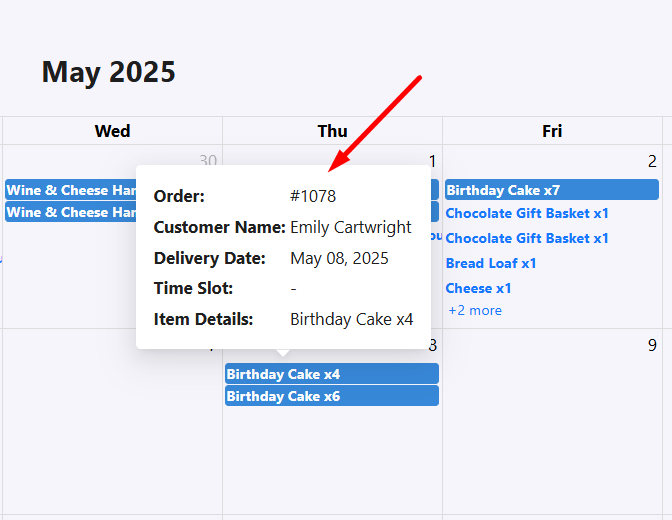
You can view key delivery details by clicking on any order directly in the calendar.

  • In your Shopify admin dashboard, go to Apps > Flexi Delivery & Pickup Date > Delivery Calendar.
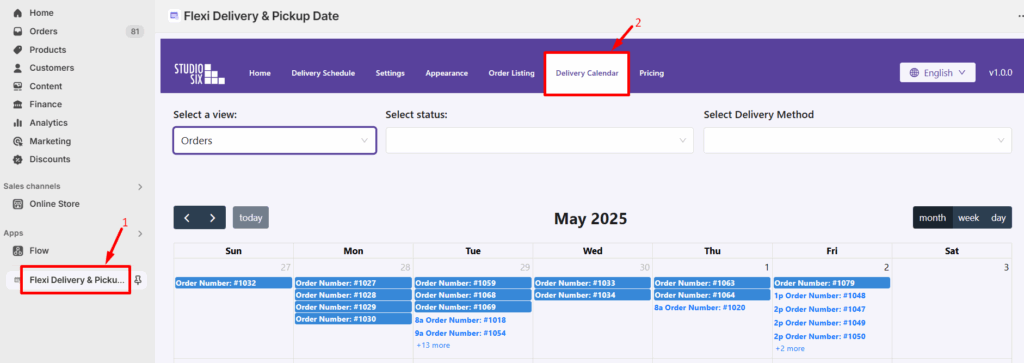
  • To view full delivery details, hover over the order in the calendar and click on it. A pop-up will appear showing:
    • Order number
    • Customer name
    • Delivery date
    • Time slot
    • Item details

This helps you quickly access all the key information for each scheduled delivery.

What are your feelings
Share This Article:
  • Facebook
  • X
  • LinkedIn
  • Pinterest
Updated on May 12, 2025

Studio Six Apps

  • Blog
  • About
  • FAQs
  • Authors
  • Events
  • Shop
  • Patterns
  • Themes

Twenty Twenty-Five

Designed with WordPress